| |
Routines |
| Prev: 601F | Up: Map | Next: 6077 |
|
||||||||||
| DrawPlayArea | 602E | LD HL,($5C36) | Stash CHARS on the stack. | |||||||
| 6031 | PUSH HL | |||||||||
| 6032 | LD HL,$76D6 | Write UDG_Brick to CHARS. | ||||||||
| 6035 | LD ($5C36),HL | |||||||||
|
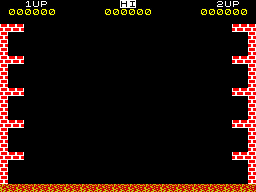
Create the left-hand wall.
|
||||||||||
| 6038 | LD DE,$6087 | DE=Message_Bricks_LR. | ||||||||
| 603B | LD HL,$1800 | HL=1800 (screen position). | ||||||||
| 603E | LD B,$14 | Set the brick counter to 14 (the wall is 14 bricks high). | ||||||||
| 6040 | CALL PrintString_Wrapper | Print the wall using PrintString_Wrapper. | ||||||||
|
Create the right-hand wall.
|
||||||||||
| 6043 | LD HL,$18F8 | HL=18F8 (screen position). | ||||||||
| 6046 | LD B,$14 | Set the brick counter to 14 (the wall is 14 bricks high). | ||||||||
| 6048 | CALL PrintString_Wrapper | Print the wall using PrintString_Wrapper. | ||||||||
|
Create the left-hand cubby hole shelves.
|
||||||||||
| 604B | LD DE,$6089 | DE=Message_Bricks_Cubby. | ||||||||
| 604E | LD HL,$1800 | HL=1800 (screen position). | ||||||||
| 6051 | CALL DrawCubbyHoleShelves | Draw the shelves using DrawCubbyHoleShelves. | ||||||||
|
Create the right-hand cubby hole shelves.
|
||||||||||
| 6054 | LD HL,$18E8 | HL=18E8 (screen position). | ||||||||
| 6057 | CALL DrawCubbyHoleShelves | Draw the shelves using DrawCubbyHoleShelves. | ||||||||
|
Create the floor, which is 10 tiles wide.
|
||||||||||
| 605A | LD HL,$B800 | HL=B800 (screen position). | ||||||||
| 605D | LD DE,$608D | DE=Message_Floor. | ||||||||
| 6060 | LD C,$10 | Set the tile counter in C to 10. | ||||||||
| DrawPlayArea_FloorLoop | 6062 | LD B,$01 | Set the row counter in B to 01 (the tile is one row high). | |||||||
| 6064 | CALL PrintString_Wrapper | Print the tile using PrintString_Wrapper. | ||||||||
| 6067 | LD A,L | Move the screen position 10 pixels to the right and back up 08 pixels to the row it was printed on. | ||||||||
| 6068 | ADD A,$10 | |||||||||
| 606A | LD L,A | |||||||||
| 606B | LD A,H | |||||||||
| 606C | SUB $08 | |||||||||
| 606E | LD H,A | |||||||||
| 606F | DEC C | Decrease the tile counter by one and loop back to DrawPlayArea_FloorLoop until the whole floor has been drawn. | ||||||||
| 6070 | JR NZ,DrawPlayArea_FloorLoop | |||||||||
| 6072 | POP HL | Restore CHARS from the stack, and write it back to 5C36. | ||||||||
| 6073 | LD ($5C36),HL | |||||||||
| 6076 | RET | Return. | ||||||||
| Prev: 601F | Up: Map | Next: 6077 |