|
Routines |
| Prev: A219 | Up: Map | Next: A2CE |
|
Used by the routine at EnterRoom.
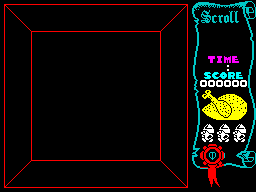
Sets the attributes of the side panel. The whole panel is filled with a colour that is picked from the attribute of the room, and then a shape and some bands of colour are put on top. ClearPlayArea_Row, which fills a block of cells with a value, does most of the work.
|
||||||||
|
||||||||
| DrawSidePanelAttrs | A240 | LD HL,$00C0 | HL=C0 (the Y position is 00 and the X position is C0), which is the top left of the side panel. | |||||
| A243 | CALL AttributeAddress | Call AttributeAddress to get the attribute address of the position. | ||||||
| A246 | LD BC,$0818 | B=08 (the width of the panel in cells) and C=18 (the number of rows). | ||||||
|
Pick the colour for the panel. Take the inverse of bits 0-2 of the attribute of the room, unless that is less than 02 when 44 is used.
|
||||||||
| A249 | LD A,($5E1A) | Fetch the room attribute from CurrentRoom_Attribute. | ||||||
| A24C | CPL | Flip the bits. | ||||||
| A24D | AND %00000111 | Keep only bits 0-2. | ||||||
| A24F | CP $02 | Jump to DrawSidePanelAttrs_Colour if the colour is 02 or more. | ||||||
| A251 | JR NC,DrawSidePanelAttrs_Colour | |||||||
| A253 | LD A,$44 | A=44. | ||||||
| DrawSidePanelAttrs_Colour | A255 | LD E,A | Keep the attribute of the panel in E. | |||||
| A256 | PUSH DE | Stash the attribute of the panel on the stack. | ||||||
| DrawSidePanelAttrs_Row | A257 | PUSH BC | Stash the width and the number of rows on the stack. | |||||
| A258 | PUSH HL | Stash the attribute address on the stack. | ||||||
| DrawSidePanelAttrs_Cell | A259 | LD (HL),E | Write the attribute of the panel to the cell. | |||||
| A25A | INC L | Move to the next cell. | ||||||
| A25B | DJNZ DrawSidePanelAttrs_Cell | Decrease the width by one and loop back to DrawSidePanelAttrs_Cell until the row is done. | ||||||
| A25D | POP HL | Restore the attribute address from the stack. | ||||||
| A25E | LD BC,$0020 | BC=0020. | ||||||
| A261 | ADD HL,BC | Move down a row. | ||||||
| A262 | POP BC | Restore the width and the number of rows from the stack. | ||||||
| A263 | DEC C | Decrease the number of rows by one and loop back to DrawSidePanelAttrs_Row until all of the rows have been set. | ||||||
| A264 | JR NZ,DrawSidePanelAttrs_Row | |||||||
|
Fill a square of three by three cells, and then a cell and a square of two by two cells below it, with the attribute of the room. Then put the attribute of the panel back in the middle of the three by three square.
|
||||||||
| A266 | LD HL,$90C8 | HL=90C8 (the Y position is 90 and the X position is C8). | ||||||
| A269 | CALL AttributeAddress | Call AttributeAddress to get the attribute address of the position. | ||||||
| A26C | LD A,($5E1A) | Fetch the room attribute from CurrentRoom_Attribute. | ||||||
| A26F | LD BC,$0303 | B=03 (the width) and C=03 (the number of rows). | ||||||
| A272 | CALL ClearPlayArea_Row | Call ClearPlayArea_Row to fill the cells with the attribute of the room. | ||||||
| A275 | INC L | Move to the next cell. | ||||||
| A276 | LD (HL),A | Write the attribute of the room to the cell. | ||||||
| A277 | ADD HL,DE | Move down a row (DE is 0020 after the call). | ||||||
| A278 | LD BC,$0202 | B=02 (the width) and C=02 (the number of rows). | ||||||
| A27B | CALL ClearPlayArea_Row | Call ClearPlayArea_Row to fill the cells with the attribute of the room. | ||||||
| A27E | LD HL,$98D0 | HL=98D0 (the Y position is 98 and the X position is D0). | ||||||
| A281 | CALL AttributeAddress | Call AttributeAddress to get the attribute address of the position. | ||||||
| A284 | POP DE | Restore the attribute of the panel from the stack. | ||||||
| A285 | LD (HL),E | Write it to the cell. | ||||||
|
Colour the bands of the panel from the bottom upwards. Each is filled with ClearPlayArea_Row.
|
||||||||
| A286 | LD HL,$7DC8 | HL=7DC8 (the Y position is 7D and the X position is C8). | ||||||
| A289 | CALL AttributeAddress | Call AttributeAddress to get the attribute address of the position. | ||||||
| A28C | LD BC,$0603 | B=06 (the width) and C=03 (the number of rows). | ||||||
| A28F | LD A,$47 | A=47 (bright white). | ||||||
| A291 | CALL ClearPlayArea_Row | Call ClearPlayArea_Row to fill the cells. | ||||||
| A294 | LD HL,$5FC8 | HL=5FC8 (the Y position is 5F and the X position is C8). | ||||||
| A297 | CALL AttributeAddress | Call AttributeAddress to get the attribute address of the position. | ||||||
| A29A | LD BC,$0604 | B=06 (the width) and C=04 (the number of rows). | ||||||
| A29D | LD A,$46 | A=46 (bright yellow). | ||||||
| A29F | CALL ClearPlayArea_Row | Call ClearPlayArea_Row to fill the cells. | ||||||
| A2A2 | LD HL,$48C8 | HL=48C8 (the Y position is 48 and the X position is C8). | ||||||
| A2A5 | CALL AttributeAddress | Call AttributeAddress to get the attribute address of the position. | ||||||
| A2A8 | LD BC,$0601 | B=06 (the width) and C=01 (the number of rows). | ||||||
| A2AB | LD A,$45 | A=45 (bright cyan). | ||||||
| A2AD | CALL ClearPlayArea_Row | Call ClearPlayArea_Row to fill the cells. | ||||||
| A2B0 | LD BC,$0601 | B=06 (the width) and C=01 (the number of rows). | ||||||
| A2B3 | LD A,$47 | A=47 (bright white). | ||||||
| A2B5 | CALL ClearPlayArea_Row | Call ClearPlayArea_Row to fill the cells in the next row down. | ||||||
| A2B8 | LD HL,$38C8 | HL=38C8 (the Y position is 38 and the X position is C8). | ||||||
| A2BB | CALL AttributeAddress | Call AttributeAddress to get the attribute address of the position. | ||||||
| A2BE | LD BC,$0601 | B=06 (the width) and C=01 (the number of rows). | ||||||
| A2C1 | LD A,$43 | A=43 (bright magenta). | ||||||
| A2C3 | CALL ClearPlayArea_Row | Call ClearPlayArea_Row to fill the cells. | ||||||
| A2C6 | LD BC,$0601 | B=06 (the width) and C=01 (the number of rows). | ||||||
| A2C9 | LD A,$47 | A=47 (bright white). | ||||||
| A2CB | JP ClearPlayArea_Row | Jump to ClearPlayArea_Row to fill the cells in the next row down. | ||||||
| Prev: A219 | Up: Map | Next: A2CE |