|
Routines |
| Prev: 24495 | Up: Map | Next: 24545 |
|
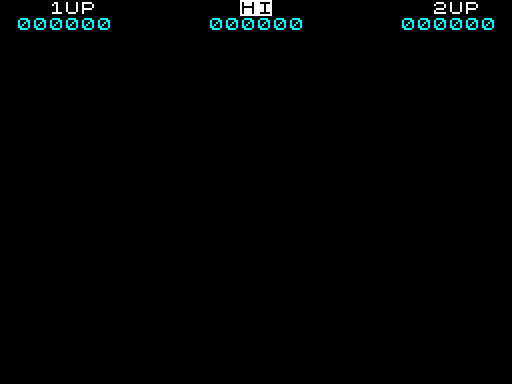
Clears the screen and draws the top line of the game window: the 1UP, HI and 2UP labels, the colours for the lives icons, and the three scores.
|
|||||
|
Blank the screen and write the banner.
|
|||||
| CreateWindow | 24503 | CALL ResetAttributes | Blank the attribute buffer using ResetAttributes. | ||
| 24506 | CALL ResetScreen | Blank the screen buffer using ResetScreen. | |||
| 24509 | CALL PrintBanner | Print the "1UP", "HI" and "2UP" labels using PrintBanner. | |||
|
Set the attributes for the 1UP lives graphic.
|
|||||
| 24512 | LD HL,22536 | Set the attribute buffer address of the 1UP lives. | |||
| 24515 | LD A,71 | Set the colour of the lives to INK:WHITE, PAPER:BLACK (BRIGHT). | |||
| 24517 | LD (HL),A | Colour the 1UP lives digit. | |||
| 24518 | INC HL | Move onto the next column. | |||
| 24519 | LD (HL),A | Colour the 1UP lives icon. | |||
|
Set the attributes for the 2UP lives graphic.
|
|||||
| 24520 | LD HL,22550 | Set the attribute buffer address of the 2UP lives. | |||
| 24523 | LD (HL),A | Colour the 2UP lives digit. | |||
| 24524 | INC HL | Move onto the next column. | |||
| 24525 | LD (HL),A | Colour the 2UP lives icon. | |||
|
Set the attributes for the score line (the whole line is INK:CYAN, PAPER:BLACK (BRIGHT)).
|
|||||
| 24526 | LD HL,22560 | Set the attribute buffer address of the score line. | |||
| 24529 | LD BC,8261 | Set the column counter to 32 (the width of the screen) and the colour of the score line to INK:CYAN, PAPER:BLACK (BRIGHT). | |||
| CreateWindow_Loop | 24532 | LD (HL),C | Colour a cell of the score line. | ||
| 24533 | INC L | Move onto the next column. | |||
| 24534 | DJNZ CreateWindow_Loop | Decrease the column counter by one and loop back to CreateWindow_Loop until the whole score line has been coloured. | |||
|
Write the 1UP, 2UP and HI scores.
|
|||||
| 24536 | CALL Score_1UP | Print the 1UP score using Score_1UP. | |||
| 24539 | CALL Score_2UP | Print the 2UP score using Score_2UP. | |||
| 24542 | JP Score_HI | Jump to Score_HI to print the high score. | |||
|
View the equivalent code in;
|
|||||
| Prev: 24495 | Up: Map | Next: 24545 |